Scripting
|
My first experience as Scripter dates back to my final-year project at Supinfogame. Our team was composed of 6 students, and only one of us had a background in programming. I consequently volunteered to take part in the implementation of our prototype as well: Little Jurassic People. I haven't never stopped scripting since. First on the ShiVa Engine we used for our final-year project (LUA), then on the well-known Unity 3D (C#). I greatly enjoy implementing systems pieces by pieces, and watching the synergy finally taking place. These scripting skills have improved my ability to convey ideas to Engineers, to better understand technical restrictions - but also to develop tools for the Design team. |
|


Unity 3D
 |
Unity 3D is the main engine I use to develop game prototypes. I like to challenge myself by designing and implementing new gameplay each time I start a new project. I have already tackled many features Unity offers - for both 3D and 2D games - and plan to soon have a deeper look at particle systems. All these projects have been developed using the C# programming language. I know plugins such as Bolt also offer Visual Scripting solutions - but I already use Visual Scripting daily as explained in the next section. Developing games in C# then completes my knowledge with a different mindset that forces me to carefully structure the whole code in a more optimal way, and to give as much attention to micro-details to prevent syntax errors. |
My choice to switch from ShiVa Engine to Unity 3D has also been greatly impacted by the very-active community of the latter, and its Asset Store. Indeed, my versatile skills allow me to both design and code - but I must admit I'm far from being an Artist. I can certainly edit Sprites and GUI templates - but my skill set doesn't allow me yet to create assets from scratch that are good enough to be shipped.
Visual Scripting
Wikipedia defines Visual Scripting as a tool to develop programs "by manipulating elements graphically rather than by specifying them textually". It has the advantage of lowering the entry level for programming - by making it more visual, and easier to understand by uninitiated developers.
|
I had the opportunity to acquire an advance knowledge in Visual Scripting and an expertise in Ubisoft's proprietary engine "Snowdrop". My technical tendency allowed me to quickly assimilate the specificities of these languages, and to get appointed as a proud member of the "Scripting Justice League". As such, I also hold the same responsibilities as Technical Game Designers:
|
Microsoft Office
Like most Designers, I daily use Microsoft Office for documenting systems and mechanics. However, I learnt to use the suite beyond the usual skill set. This tendency results in advanced animations in PowerPoint, complex formulas in Excel - but also VBA macros. Indeed, I regularly create macros to resolve slow downs the Design team faces, and at home, to accelerate the development of for my own game prototypes.
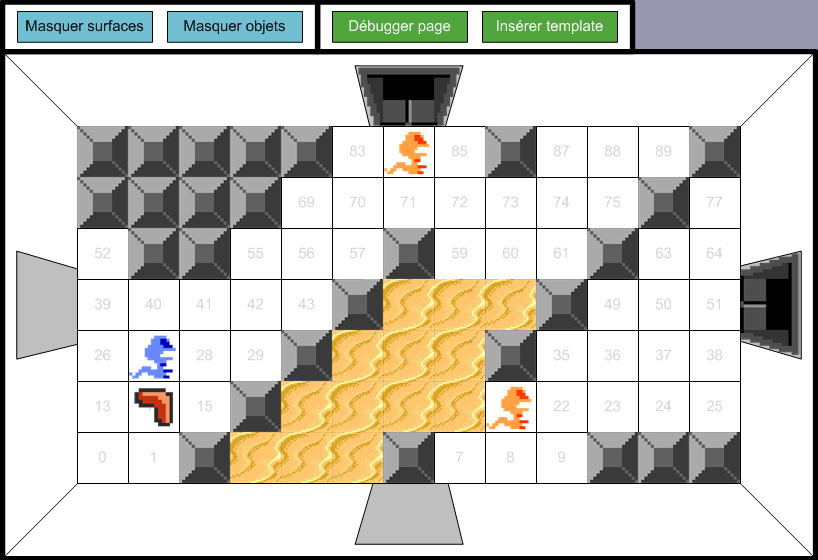
Few here examples of level editors that I entirely scripted in Microsoft Visio. Both have been created to facilitate the design of 2D levels for a puzzle game, and a remake of the original Zelda. They support basic macros adjusting the positions of gameplay elements on the grid, displaying/hiding layers, creating new templates - but also more complex macros highlighting any kinds of errors, and exporting the suite of levels as XML files.
 |
 |